
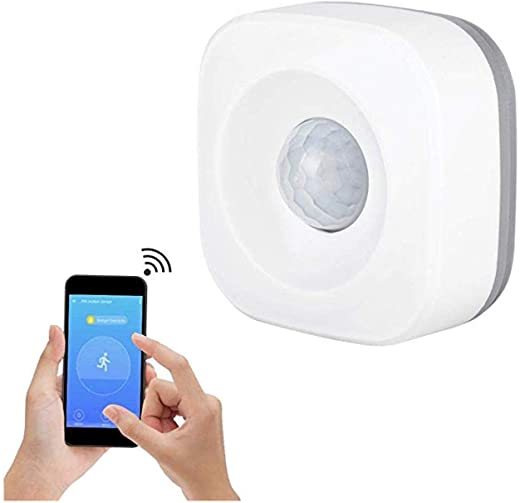




ZIGBEE Motion Sensor for Echo Plus, Echo Studio & Echo Show 2nd Generation
$59.99
- Compatible with ECHO PLUS, ECHO STUDIO, ECHO SHOW 2 Gen, DeConz, RaspBee, Hubitat Elevation This is not WIFI device. Not compatible with Philips Hue! PLEASE refrain from purchasing if have no idea about Zigbee or do not own a compatible Zigbee Gateway.(not work with smarthing)
- This Zigbee Motion Sensor is fully compatible with Amazon Echo Plus and Echo Show 2nd Gen. Expand your Echo’s Zigbee functionality
- Easy setup, simply reset the device and ask Alexa to discover new devices. Once the motion sensor is added, it is possible to create all types of pre-defined routines in Alexa app
- Multiple ways to use with Alexa routines, e.g. You may set it up to have your Hue lights switched on when a motion is detected, and switch them off when there is no motion for a certain period
- The smart sensor works with 3xAAA battery and it can work continuously for 6 months in 2 min mode(4min mode up to 12 months) (batteries not included). please Read connecting steps on image or the instruction manual which in the package first before the smart sensor was installed.
Specification: ZIGBEE Motion Sensor for Echo Plus, Echo Studio & Echo Show 2nd Generation
| Package Dimensions | 2.8 x 2.68 x 1.34 inches |
|---|---|
| Item Weight | 3.2 ounces |
| Batteries | 1 AA batteries required. (included) |
| Date First Available | November 27, 2020 |
| Manufacturer | S |
7 reviews for ZIGBEE Motion Sensor for Echo Plus, Echo Studio & Echo Show 2nd Generation
Add a review
Related Products
Added to wishlistRemoved from wishlist 0

Added to wishlistRemoved from wishlist 0
Added to wishlistRemoved from wishlist 0
Amazon Customer –
I usually try to avoid generic items with no reviews but took a chance on this one because of the price, and I’m happy with it so far. Don’t forget you need to have a hub that will handle Zigbee for this to work, if you do not have one I would not purchase this.
It appears to detect motion up to about 10-12 feet away, so should be fine for most rooms. My Hubitat hub recognized when I put it in discovery mode. It works with Alexa through my hub and am able to set it to turn lights on when motion is detected and turn them off when no motion is detected for a set amount of time. Also the description said batteries were not included but mine did come with them, so that was a bonus.
My only complain would be that it is slightly confusing to set up and some of the directions are misleading. They give a QR code to download and app, but it took me to a site that was all in Chinese and it said to use the Smartlife app. If you have a hub (which you need anyway) you should not need to do this as it should just connect to your hub. Mine would not connect straight to Smartlife or Alexa, I had to go through Hubitat.
So basically to set it up (and again I use Hubitat so your might be different) just go into the app for your hub how you would normally add devices, put the device into pairing mode by holding the button in back down for 5 seconds with the little metal thing provided and it should recognize it. Then in the Alexa app I had to remove Hubitat from my skills and re-add it (this could be a pain but maybe there’s a better way I don’t know about) and then I was able to use it in the Alexa app.
Neil Hickox –
If I put it in connect mode (reset button held for 5 seconds) and I search nearby in SmartThings, it will be found and added automatically; but doesn’t work. It shows up in the device list, but says it can’t connect to the device.
Thomas –
This little motion detector works great with the Echo Show 10.1… I took it out of the box, put in the batteries, pushed the reset button until the light starter flashing (5 seconds) and asked Alexa to discover it. I was up and running, all in about 5 minutes or less. I didn’t even have to download any new apps on my phone.
ped28 –
I bought this to install in my mailbox so that I’d be able to tell when my mail arrives. I had to get a newer Amazon Echo (the spherical one) so that I would have a Zigbee hub. I couldn’t figure out how to connect this through the SmartLife app and would have tried harder, but I was able to see the connection through the Alexa app by using “find devices”. Then I set up a notification and called it “mail has arrived” within the Alexa app. So when it detects motion, I get a notification “mail has arrived”. There’s a few minute reset delay between notifications automatically set, so I usually only get one notification. I don’t think there’s any way to change the delay time. My mailbox is about 20 feet from my Echo/Zigbee hub.
It’s working well for me, but I had to add some foam padding to the mailbox door because the wind caused a lot of false alerts. Now it’s reliable. It’s a great product for its purpose. I can’t speak to battery life yet.
W. Terrell –
I programmed it to detect motion in the front entry way area, and turn on an overhead light for a few minutes. After bedtime hours, it has a different ‘reaction’ to carry out.
Carlos Cuevas –
Funciona bien
nevillagain –
Works fine, lasts along time, fail safe and drains to the bildge, but not sailor proof, do don’t mess with it.